
Approval, PDF generation, email delivery and settlement are separate events. Verify each result before assuming an order has been invoiced or paid.
Starting context
Before you start
- A synchronized net-terms order and the correct company/location credit policy.
- Verified payment instructions and evidence that any manually recorded receipt reached your business.
Approve and deliver
Manual approval is available on all NetGuard plans. Automatic and bulk approval require Pro or Business. Declining in NetGuard does not cancel a Shopify order.
Open Orders → Your approval queue. Use Search and Status to find the order; inspect company, branch, amount and current credit.
Expected resultYou know who receives credit. Waiting and held orders have distinct reasons rather than one generic failure state.
Use the eligible order’s approval action and read its confirmation. Resolve any over-limit or monthly invoice-cap refusal before continuing.
Expected resultApproval starts invoice creation; repeated clicks are not a remedy for a legitimate policy or plan restriction.
Open the invoice in Invoices. Check PDF/email states, then Download PDF and inspect the invoice number, due date, currency and captured instructions.
Expected resultA ready PDF downloads. Invoice creation, PDF readiness and sent email are distinct; use the displayed recovery action if one fails.
For another copy, choose Resend email, verify the recipient/action and confirm. Review delivery feedback before retrying.
Expected resultThe existing invoice is resent without creating a second receivable. Sent does not prove that the buyer read the message.
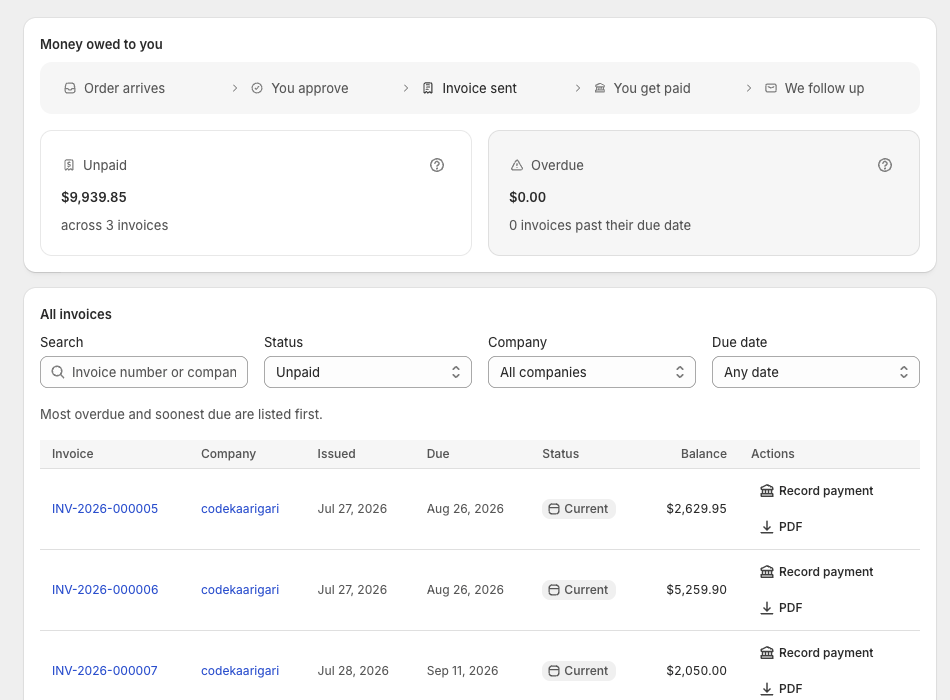
Record money already received
Manual partial receipts are available on every NetGuard plan. Recording confirms your verification; it does not initiate or independently verify a bank transfer.
Open the invoice → Record payment. Enter Amount received, How they paid, Date received and Reference; use the actual receipt date.
Expected resultBank transfer, Cash, Cheque or Other identifies the receipt. A bank reference or cheque number helps reconcile it later.
Review duplicate and overpayment warnings, then record once. Inspect the remaining balance and payment history immediately afterward.
Expected resultApplied money reduces debt. Excess becomes company credit held, not an automatic refund; duplicate entries can credit the buyer twice.
To correct a mistaken receipt, use its edit action, read the balance warning and save the corrected amount/date/method/reference.
Expected resultThe record and derived balances update. Editing is a financial correction, not another transfer; review company Owes you and Credit held.
If credit is already held for the company, use Apply credit on the invoice and confirm the displayed amounts.
Expected resultExisting credit is applied explicitly. Invoice balance and credit held decrease together; no bank money moves.
Handle changes and cancellations
Preserve the original invoice rather than silently rewriting an issued document.
For an order-change alert, compare Shopify’s current total to the invoice. Read Cancel and reissue and enter the required reason if that is the right remedy.
Expected resultThe original is retained as cancelled and a new number/due date is created. Previously collected money can become account credit for explicit application.
For standalone cancellation, read Cancel invoice and supply a reason. Handle any Shopify order cancellation or refund separately through the original payment processor and inspect the final ledger.
Expected resultInvoice cancellation does not cancel the Shopify order or initiate a bank refund. NetGuard’s credit-held ledger is an accounting record, not a cash wallet or an alternative refund method. Historical invoices/PDFs support reconciliation.
Keep in mind. NetGuard is not a tax-filing service. Check local format/retention obligations. Inspect older PDFs before assuming new bank instructions or branding rewrote them.
Check before retrying
If the result differs
- Approved order has no invoice
- Use the displayed approved-without-invoice recovery path; inspect the error and current monthly cap before retrying.
- The buyer says they paid
- Match the receipt/reference before manual recording. An opened or pending portal checkout is not settlement.
- Shopify still shows an unpaid amount
- Check automatic paid-order sync in Settings, background processing and Shopify plan. Partial original-order write-back requires Plus; compare the NetGuard ledger separately.
Contact NetGuard support with the store domain, record identifier and the result you expected. Redact unrelated personal information.