
The credit layer for Shopify B2B
Extend credit.
Keep control.
Let wholesale buyers buy on terms. Keep credit limits, order approvals, invoices and receivables in one connected workflow.
For Shopify B2B on Basic, Grow, Advanced and Plus.
Free plan. 30-day Pro trial for eligible first installs.

$18,000 USD available
The whole picture. Not another spreadsheet.
Your credit desk.
All in focus.
From the buyer’s next order to your oldest receivable. Make the next decision with the account’s position in view.
Know where the money stands.
Outstanding balances, invoice aging and company exposure. A working view of what needs your attention.
See the workflow ↗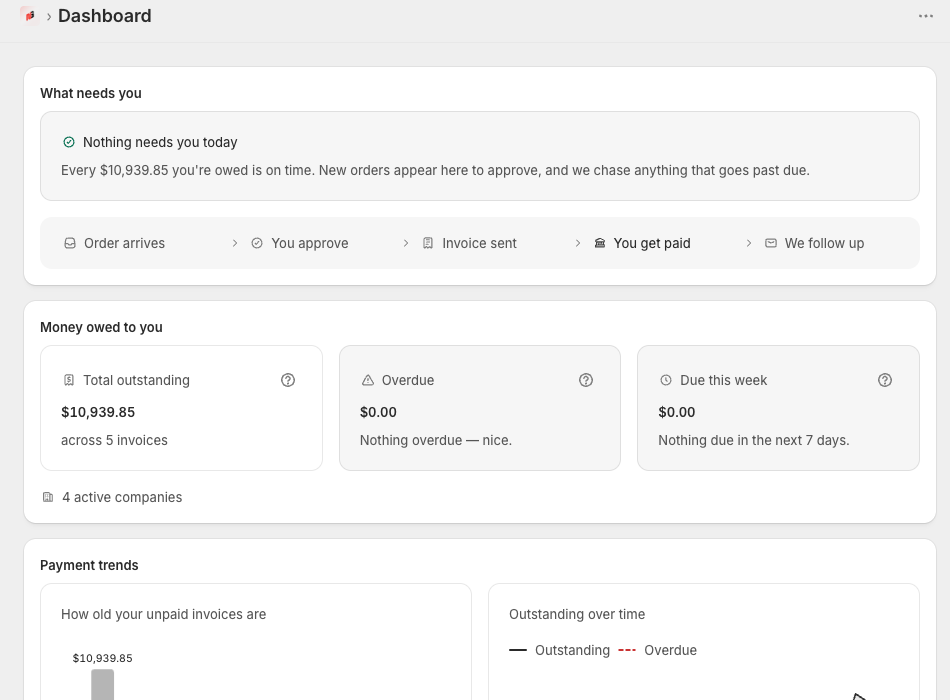
Control at every handoff
Credit isn’t one decision.
It’s a connected system.
Set the rules once. Keep the evidence, invoices and follow-through together.
Credit governance
Give every buyer a boundary.
Set company and location limits, payment terms, holds and approval thresholds.
Read the guide ↗Checkout validation
Catch exposure before the order.
Check the B2B purchasing context against available credit with an enabled Shopify validation rule.
Read the guide ↗Credit rule checked at checkout
Order to invoice
A paper trail worth keeping.
Review wholesale orders and create branded PDF invoices with due dates and payment instructions.
Read the guide ↗Accounted for.
Receivables & reminders
Know what needs a nudge.
Track overdue balances, export records, and automate scheduled reminders on Pro and Business.
Read the guide ↗From order to paid
One clear path.
Every credit sale.
Shopify runs the checkout. NetGuard connects the controls and follow-through.
Set the boundaries
Import companies. Define limits and terms. Enable the checkout validation rule.
Review and invoice
Apply your approval workflow. Generate a PDF invoice with a clear due date.
Follow through
Monitor balances, send reminders on eligible plans, and give buyers invoice access.

Your workflow. Connected in Shopify.
The buyer’s side of the desk
Fewer “can you resend
that invoice?” emails.
Authorized B2B buyers can view invoices, download PDFs and use available Shopify payment actions from their customer accounts.
Explore the buyer experience ↗Find My Invoices on the customer-account Orders page.
Active company contacts see company-wide invoices.
Payment availability depends on plan and invoice state.
A plan for your book of business
Start with control.
Grow into automation.
Prices in USD. Paid plans require approval and are billed through Shopify.
Get your credit desk in order
Free
$ 0USD / month
- 3 companies · 10 invoices/month
- Credit limits & checkout enforcement
- Manual order approval
- A/R dashboard & CSV export
- Record manual partial payments
- Buyer portal: full payments
Add automation to your operation
Pro
$ 29USD / month
- Everything in Free
- Unlimited companies & invoices
- Auto-approve & bulk approval
- Automatic & one-click reminders
- A/R aging charts & trends
- Custom invoice branding
- Buyer portal: partial payments
Make the experience your own
Business
$ 79USD / month
- Everything in Pro
- Remove Powered by NetGuard branding
- White-label invoices & buyer experience
Choose your plan inside NetGuard after installation. Eligible first installs receive a 30-day Pro trial. No paid subscription without Shopify approval.
Read the plan, trial and billing guide before upgrading.
Does NetGuard require Shopify Plus?
No blanket Plus requirement. Core Shopify B2B is available on Basic, Grow, Advanced and Plus. The optional checkout note and automatic partial-payment sync to the original Shopify order are Plus-only. Manual partial receipts remain available on all NetGuard plans; full settlement can sync when enabled.
Does NetGuard lend money or guarantee payment?
No. You decide which buyers receive terms and how much credit to offer. NetGuard provides workflow controls and visibility, not financing, credit insurance or guaranteed collection.
Can buyers see their own invoices?
Yes. In Shopify’s customer-account editor, select Orders → Main → Add block → My Invoices → Save. Assigned B2B contacts can then view their company’s accessible invoices on the Orders page. See the buyer portal guide for setup and access details.
Will it charge me after the trial?
Not without the required Shopify subscription approval. Review Settings → Billing for trial status, plan limits and any pending approval.
Where do I install or open NetGuard?
Install NetGuard from the Shopify App Store using an Install app button on this website. Existing merchants open Shopify admin → Apps → NetGuard. Follow the Getting started guide after installation.
Talk to the people who built it
Let’s get your B2B workflow right.
Installation, credit rules, invoices or billing. Tell us where you need a hand.